The bakery order form
Three groups of fields, the contact, the order itself, and the money, with nothing fuzzy left over. Print it for the market table or download the CSV for your records.
The “needed by” line is the one that saves you: if Saturday is already full, you say so in the first reply, not after the butter is creamed.
What makes it work
The item lines do quiet work. Writing each item with a quantity and a unit price means the customer watches the math build as the order grows. Sticker shock happens when a total appears out of nowhere; it does not happen when three dozen cookies at $14 a dozen add up line by line.
The totals block, subtotal, deposit, and balance due with its date, is what separates an order form from a wish list. An order with a deposit and a due date is a booking. An order without them is a hope.
Keep the allergy line even when the order is just bread. The day you skip it is the day a sesame allergy shows up.
Bread order form
Bread orders are small and they repeat, so the questions are different: which loaves, sliced or whole, and whether this is one Friday or every Friday. Hand it out at the market or send it to the neighborhood group chat.
Print your bake days and the order cutoff at the top, like “orders close Wednesday 8 pm”. Bread is the one product where an extra loaf really is waste by Monday.
Pie order form
Pie orders arrive in a rush before Thanksgiving and the December holidays, all for the same two pickup days. This form asks the questions that change the bake: size, crust, baked or take-and-bake, and when exactly it leaves your kitchen.
Set a holiday cutoff and a pie limit before you post the form. Forty pies is a plan; sixty pies is two nights without sleep.
The standing-orders sheet
If you bake the same menu every week, sourdough on Fridays, cinnamon rolls on weekends, you do not need a fresh form each time. One row per regular, one glance per week.
The first two rows are filled in so you can see how it reads; the blanks are yours. Add a printed cutoff, like “orders close Wednesday 8 pm for Friday pickup”, and your flour order stops being a guess.
| Customer | Standing order | Frequency | Day | Price | Paid through | Notes |
|---|---|---|---|---|---|---|
| Maria R. | 2 sourdough loaves | Weekly | Friday | $18 | Jun 26 | pickup 4 to 6 pm |
| Tom B. | Cookie box, mixed dozen | Every two weeks | Saturday | $25 | Jul 4 | deliver, leave at door |
Two printed pickup windows, like Friday 4 to 6 pm and Saturday 9 to 11 am, beat twenty separate “what time?” threads.
Which bakery order form do you need?
Start with the same order fields, then trim the sheet to match what you sell. A sample bakery order form should make the next step obvious: what the customer wants, when they need it, what it costs, and how the order is reserved.
| Order type | Keep on the form | Why it matters |
|---|---|---|
| Cookies or bread | Cutoff time, pickup window, quantity, paid status | You can batch the week instead of rebuilding each order from messages. |
| Donuts or pies | Flavor, quantity, pickup day, box count, payment method | Simple items still need a clear pickup promise and a total. |
| Market boxes | Customer name, box type, pickup slot, allergies | The form becomes a hold list for the table, not a custom-order interview. |
| Printable PDF | Only the fields you ask in person | Print the page or export the CSV without making the market table feel busy. |
Printable vs online
Both formats earn their keep, and many bakers run both: paper at the market table, a link everywhere else.
Paper never runs out of battery and nobody needs a link at a market stall. Online wins the moment orders come from people who are not standing in front of you.
| What matters | Printable form | Online form or shop link |
|---|---|---|
| Cost | Printing only | Free for form builders, $9.99/month for a Confita shop after a 7-day trial |
| Best at | Markets, pickups, regulars who like paper | Social media bios and group chats |
| When the order arrives | When you collect the sheet | In your inbox the moment it is sent |
| Math and totals | Done by hand, easy to slip | A shop link adds it for you |
| Menu and photos | Only what you print | Photos and prices on a shop link |
Or give customers a shop
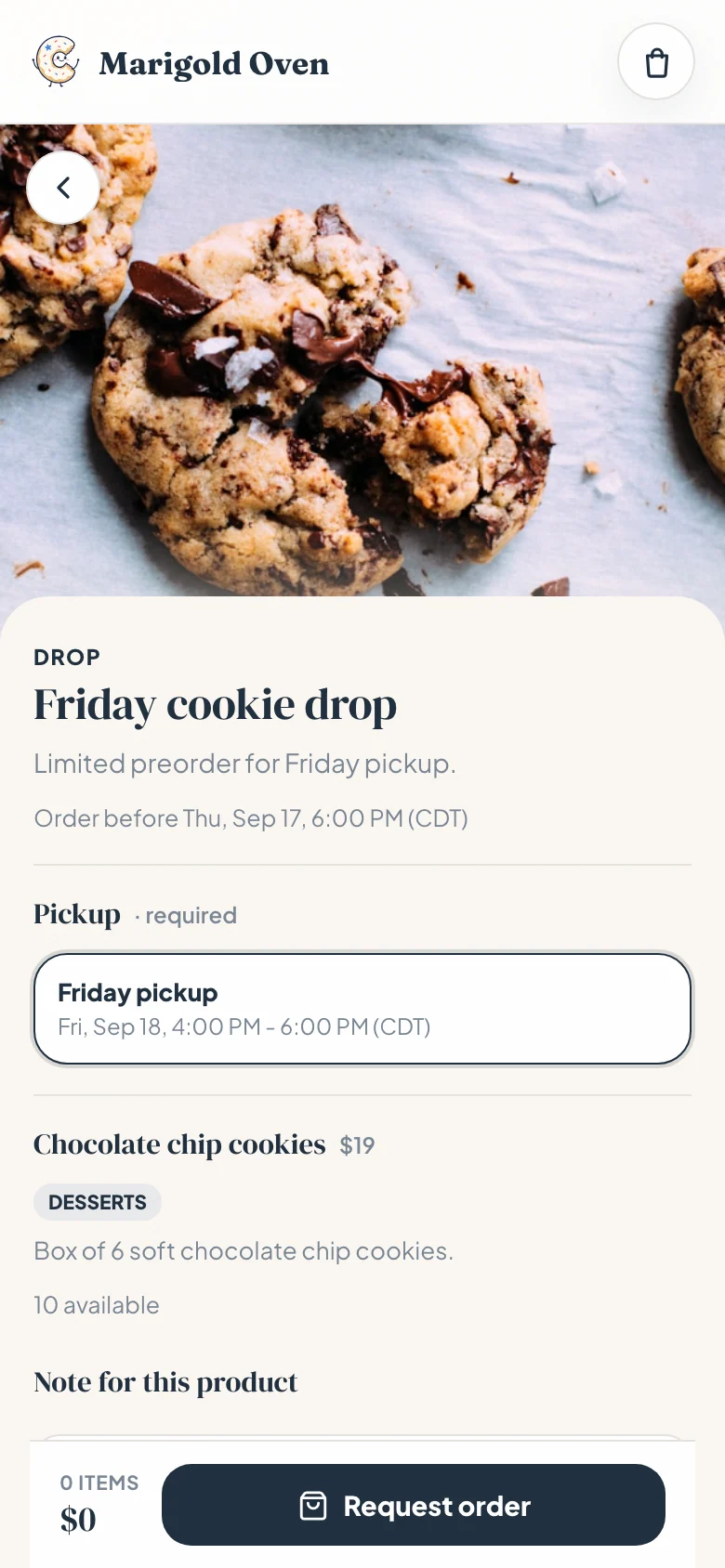
A form still makes the customer do the writing. A shop link flips that: your items sit there with photos and prices, customers tap what they want, answer your questions, and the order lands in your inbox already itemized.
Confita is that link. Products with your own questions, a schedule with capacity limits so Saturday cannot overbook itself, and private quotes with deposits for custom work. It is $9.99/month after a 7-day free trial, and your customers never install anything.
Frequently asked questions
What should a bakery order form include?
Customer name and contact, the date the order is needed, pickup or delivery, each item with quantity and unit price, a subtotal, deposit and balance due lines, the payment method, and a notes line for allergies. The sheet at the top of this page covers all of it.
Is there a free bakery order form template?
Yes, and you are looking at it: the whole form is visible at the top of this page. Download it as a CSV, copy it as text, or print the page for your market table. No signup and no email are needed.
Is there a bread or pie order form template?
Yes. Both are on this page as their own sheets. The bread order form asks for loaves, sliced or whole, and one-time or standing order. The pie order form adds size, crust, baked or take-and-bake, and the pie tin. Print either one or download it as a CSV.
Can I use this as a donut or cookie order form?
Yes. Keep the same structure and change the item lines. For donuts, cookies, cupcakes, or market boxes, list the product, quantity, unit price, pickup window, payment status, and any allergy notes.
Can I print this bakery order form?
Yes. Use the template on the page, then print it or download the CSV. It works as a printable market-table form, a weekly preorder sheet, or a starting point for a cleaner online order form.
Is there a bakery order form PDF?
Yes. Open your browser’s print option (Ctrl + P or Cmd + P on a computer, or Share and then Print on a phone) and choose “Save as PDF”. The page prints only the forms, without the menu or the article: the bakery order form, the bread and pie order forms and the standing-orders sheet, one per sheet.
Should I take deposits on bakery orders?
For large or custom orders, yes. A 50% deposit reserves the date and covers ingredients if plans change. For small weekly orders of bread or cookies, most bakers skip the deposit and rely on the order cutoff instead.
How do home bakeries take orders online?
Most start in DMs, which works until the back-and-forth eats the week. A free form builder collects answers in one place. A shop link goes one step further by showing prices and photos and carrying deposits and payment details, which is the job Confita does for $49 a year.